Tag: social-media

  • Designing Impactful Infographics: Analyzing Visuals on Stress and Wellness

    Designing Impactful Infographics: Analyzing Visuals on Stress and Wellness

    This week I was tasked with making an infographic. Before starting I wondered to myself what makes an effective infographic and how can I make it informational and visually appealing. To answer these questions, I analyzed two infographics to see what I found to be the best elements in graphics. Finding a balance of visual appeal and educating your reader can be hard but when you get it right graphics such as these can help inform people in a better way than an article.

    Infographic #1
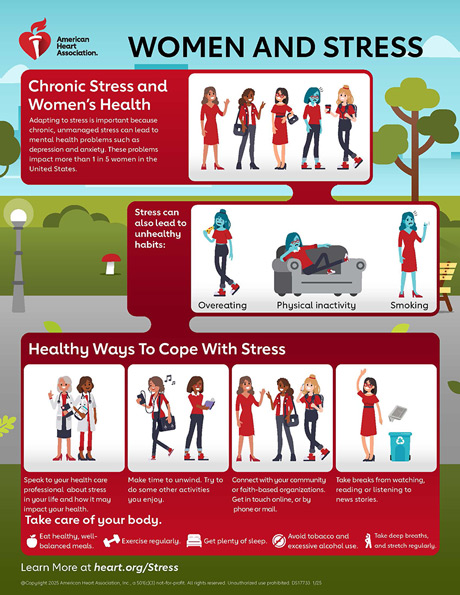
    Women and Stress infographic

    Graphic from Heart.org

    This infographic is effective and conveys the importance of managing stress with a design that makes you want to read more.

    This first stuck out to me because of the organization of information. The graphic starts out sharing what they are focusing, chronic stress and women’s health. Then it moves on to share why this can be bad followed by how you can better manage your stress.

    The headings and photos help make it an easy graphic to skim and get the main points. The bright colors also help draw your eyes to what they are saying without taking away from the information. The font is simple and bolded when appropriate further helping the reading experience. There is a good balance between text and visuals, the photos help convey the message without taking away from the text.

    Infographic #2

    Graphic from pesi.com

    The data in the first section of the infographic helps the reader better understand why it is important to manage your stress and how many people struggle with this. The powerful statistic that one in five women struggle with mental health made me want to keep reading to see what the recommendation is.

    Overall, I think this is a good example of an infographic. It is clear and concise, gives the reader a call to action, and shares where you can find more information. I will incorporate the flow of information into my own work to clearly inform the readers on what the call to action is.

    This second infographic takes a different approach to effectively communicating information. The design is fun with a number of graphics that help add to the text and help with readability. The color scheme is not too bright but takes advantage of the brighter colors for main points. Additionally, the hearts for the bullet point numbers make it more visually appealing.

    The graphic doesn’t include hard data but instead shares why each of these tips are effective to boosting your mood with intentional eating choices. The website does say this graphic aims to educate on the impact food has on mental health. I do think data points would help strengthen this infographic but there is also enough text as is.

    The font of this graphic combined with the different colors help draw the readers eyes to main points. I like that you can skim this for quick tips or read it more in depth if you want to learn more.

    I think this infographic is a bit text heavy but there are things I would include in my own infographic. I like the colors chosen, the visuals and icons, and the layout of the text.

    My key takeaways

    There are many ways to make an effective infographic and analyzing what works for different graphics and readers is helping me improve my own design skills. In my own infographic, I plan to use a similar layout to the first infographic since I found it easy to skim and visually appealing. Additionally, the use of fun bullet points in the second graphic is something I want to incorporate to spice up the graphic, making it feel like a more fun read.

     Next time you see an infographic think to yourself how is this effective? What would I use in my own infographic?
  • Logging Off to Tune In

    Logging Off to Tune In

    It is no secret that we, as a society, have become reliant on our screens. The American Psychological Association reports that teens spend, on average, 4.8 hours a day on social media. This doesn’t surprise me – between school, social media, texting, and of course mindless scrolling I use my phone for basically everything.

    Reaching for my phone has become this built-in time filler integrated into nearly every task. Now don’t worry this isn’t going to be a post on how we should all get off our phones forever. I do believe there are certain benefits to using our phones. But recently, I have been questioning how can I unplug without feeling like I’m missing everything?

    NPR reported that 91% of people felt better after blocking the internet from their phones for just two weeks. As a college student, I’m not sure this was a realistic path for me to help break the doom-scrolling habits, but this opened my eyes to what a small change can do.

    My Mini Detox

    When Lent came around, I decided to give up social media at night. This felt like a good step toward living life a bit more unplugged. I had my roommate create a screentime password and lock my apps to hold myself accountable. I knew this would be challenging but I didn’t anticipate struggling as much as I did.

    Turning off my phone at night was actually a relief. This allowed me to focus on my nighttime routine and prepare for the next day. The challenge came when I’d wake up in the middle of the night and didn’t have TikTok to scroll through to fall back asleep. With social media blocked, I found myself scrolling through anything and everything I could find on my phone. This was the moment I realized I needed this push toward being unplugged.

    Although this was hard there were other aspects of this that helped me build space between my phone and the urge to scroll. Now, I find myself assuming that screen time notification is about to pop up each night – and sometimes I even wish it did.

    I have learned that yes, I might be the “screenager” I tried so hard not to become. But also, being unplugged doesn’t have to happen overnight. Slowly phasing out habits that are blocking you from connecting with others can be the first step to finding your balance in being unplugged.

    Here are 5 things that helped me replace scrolling

    1. Listen to a podcast.
      • My go to podcast has been the Mel Robbins podcast, this allowed me to focus on something else without having to stare at a screen.
    2. Go on a walk or move your body!
      • I find myself feeling antsy without the mindless scrolling. A five-minute meditation, walk, or yoga helped me clear my head and get out some energy.
    3. Leave your phone at home (when you can).
      • I get that having your phone on you can feel like a safety net. But when you’re with people you trust, try leaving that phone at home and connect with those around you.
    4. Read.
      • It sounds basic, but picking up a book that is interesting to you (not an assigned reading) can act as a good way to reset your mind.
    5. Let your phone die.
      • At times I find myself scared of my phone hitting 1% battery, but I have been trying to let it die and challenge myself to charge it only once a day. This acts as my own kind of “screen time” notification.

    Balance doesn’t mean cutting technology out altogether. It means using your screens more intentionally. Even a brief time offline can make all the difference. And hey, you might even enjoy life a bit more unplugged. I encourage you to log off – just temporarily and tune in to what is around you.